Investigating Spark Waste Across the Stack
Spark cost waste isn’t always visible in the metrics engineers typically use to judge efficiency.
aspect-ratio: auto; height: auto;
Published originally on Data Engineer Things.
Why you can't rely only on utilization
When a Spark job is expensive, utilization is usually one of the first places engineers look.
Are the executors actually using the CPUs we're paying for? Is memory underutilized? Are we simply running on machines that are too large?
Those are useful questions. But utilization only tells you whether resources are busy. It doesn't tell you whether those resources are configured efficiently, whether work is evenly distributed, whether Spark is spending time finding data rather than processing it, or whether the application is asking Spark to perform work that ultimately gets thrown away.
We've seen all four in production workloads.
A useful way to investigate Spark waste is to follow the work across the stack:
- Infrastructure / executor topology – Are the resources you're paying for actually usable, or are executor sizing and machine shape leaving capacity stranded?
- Spark execution / runtime – Is work distributed efficiently across tasks and partitions, or are skew, shuffle, spill, and stragglers driving runtime?
- Data access / storage – Is Spark efficiently getting to the data it needs, or spending time listing and reading data it actually doesn't need?
- Query plan / application code – Is the application doing necessary computation, or generating, moving, sorting, and eventually discarding huge intermediate datasets?
Each layer has different signals, different failure modes, and different ways that top-level utilization can mislead you.
Let's look at four real examples.
1. Infrastructure: when busy executors leave CPUs behind
At the infrastructure layer, CPU utilization alone can be deceptive because there are really two questions:
- Are the executors using the resources assigned to them?
- Do those executors efficiently fit onto the machines we're paying for?
The first can look healthy while the second is badly inefficient.
At this layer, the useful signals are the ones that let you reconstruct how physical resources are being divided into executors: machine cores and memory, executor cores and memory, memory-per-core ratios, executor count, and memory pressure. The question isn't simply "is CPU high?" It's how much of the machine can Spark actually allocate, and what resource becomes the packing constraint first?
Typical failures include poorly shaped executors, stranded CPU or memory, static over-provisioning, and configurations where one resource dimension prevents the rest of the machine from being used.
And this is where utilization can be misleading: an executor can be highly utilized while the machine hosting it still has capacity that can never be assigned to another executor.
Example case: orphaned vCores
A common pattern for a memory-intensive Spark job is running out of memory, because its data is distributed across too few tasks or because skew causes one task to process far more data than the others. And so the job fails with OOM.
The immediate fix is often to increase memory until the job succeeds. However, increasing memory can have unwanted side effects, especially in shared cluster environments (YARN/K8S).
Once the job stops failing, the problem appears solved – the pipeline is running again, memory is relatively cheap, and there is little reason to revisit the configuration.
That's exactly how the infrastructure waste gets buried.
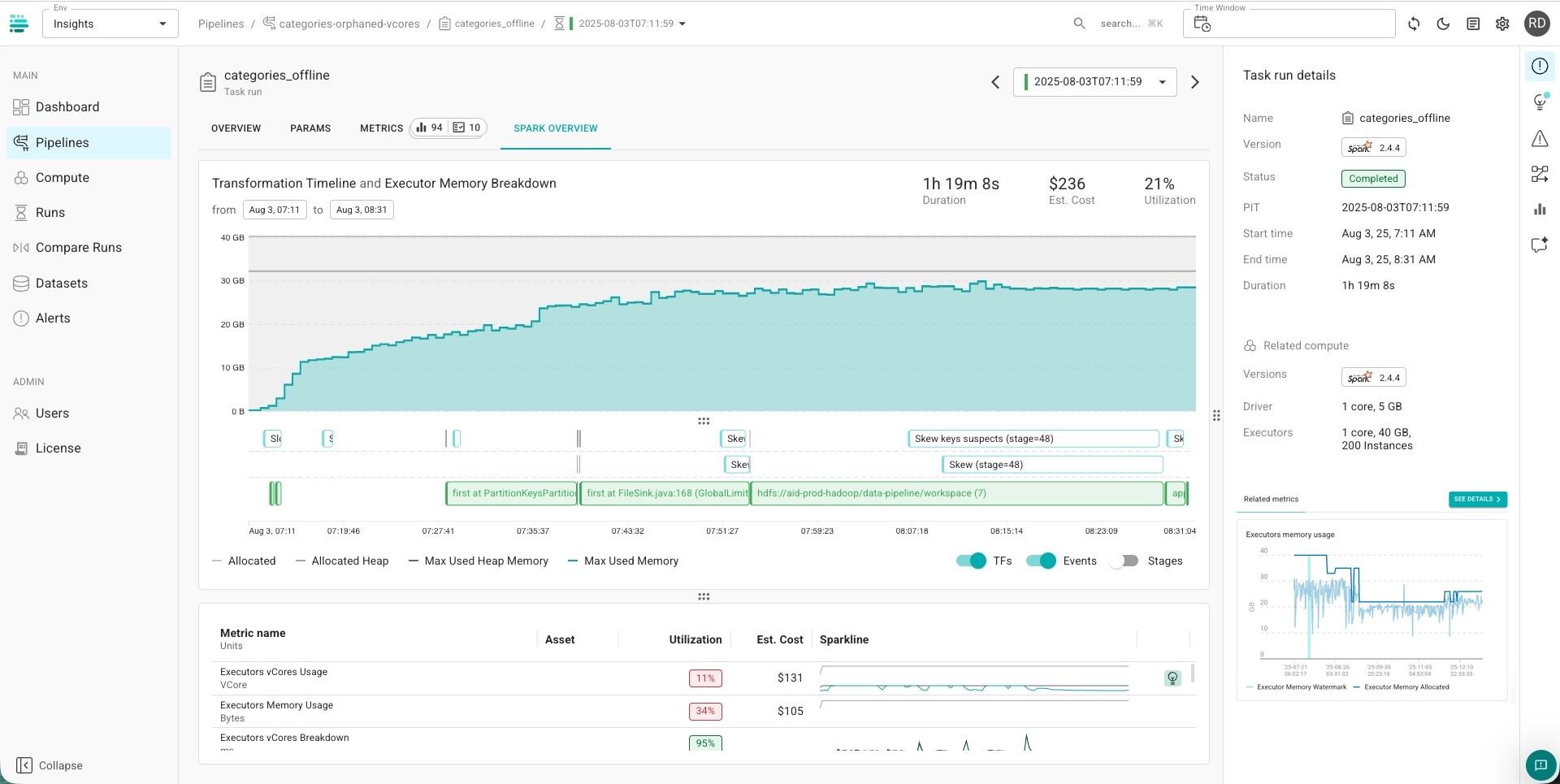
In this particular case, the pipeline was configured with 200 executors, and ended up with:
Driver:
  cores:     1
  memory:    5 GB

Executors:
  cores:     1
  memory:    40 GB
  instances: 200
The underlying machines provided roughly 8 GB of memory per vCore (64g/8c). So solving the OOM problem by provisioning more memory created massive executors of 40 GB memory with only one core.
This mismatch between executor sizing and machine resources has a price – CPU capacity that cannot be assigned to other jobs. In this case, one core was used while others were effectively stranded.
Those were orphaned vCores: CPUs provisioned as part of the machines needed to satisfy the memory allocation, but left unusable by the executor configuration.
And the usual Spark utilization metrics made the configuration look more reasonable than it actually was.
CPU utilization only showed the cores assigned to the executors. It didn't expose the additional CPU capacity stranded outside them, because Spark can only see executors.
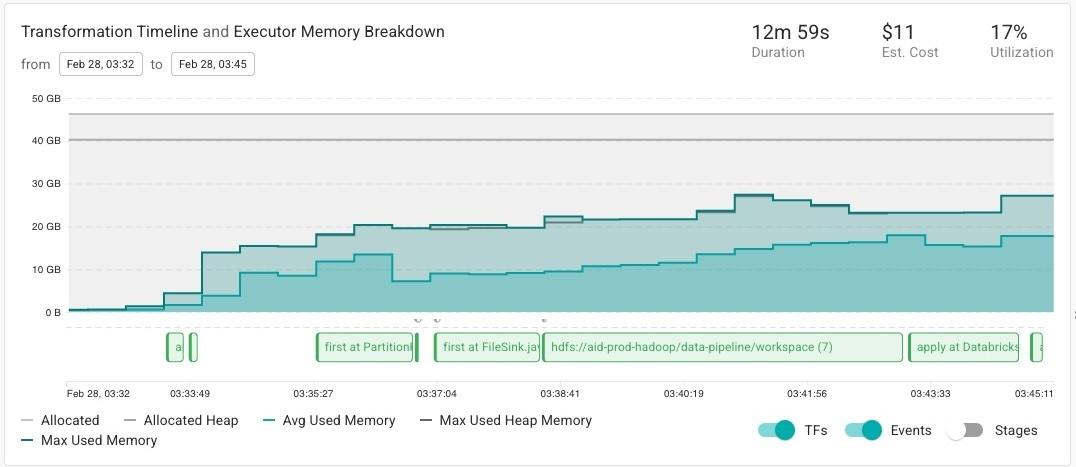
More importantly, memory itself appeared highly utilized. Average executor memory utilization was around 76.4%, which could easily reinforce the conclusion that the 40 GB allocation was necessary.
But JVM heap occupancy isn't the same thing as the workload's actual live-memory requirement. Because garbage collection doesn't immediately reclaim every object that is no longer live, heap occupancy can remain high even when a meaningful portion of that memory is reclaimable.
So the investigation had to go one level deeper: look inside the heap and distinguish live memory from occupied-but-reclaimable memory, rather than treating top-level JVM memory utilization as proof that the executor needed its full allocation.
That showed that the apparent memory pressure was overstating the workload's actual memory requirement.
The eventual configuration looked very different:
Driver:
  cores:  1
  memory: 5 GB

Executors:
  cores:  8
  memory: 46 GB

Dynamic allocation:
  minExecutors: 10
  maxExecutors: 75
The important change wasn't simply "use fewer executors." It was correcting the core-to-memory ratio that had accumulated through repeated memory increases. The new executor shape could use substantially more of the CPU capacity on each machine, while dynamic allocation allowed the number of executors to follow workload demand.
The result: 54% reduction in vCore-hours and 83% shorter runtime.
The pattern is easy to miss because the original decisions are individually reasonable: the job OOMs, add memory; it still OOMs, add more; it succeeds, move on.
The thing to revisit is the configuration that remains afterward. If a Spark job has accumulated memory over time to stay stable, check whether that memory is actually live, how the executor shape maps onto the underlying machines, and how much CPU capacity was added along with it but never became usable.
2. Spark execution: averages hide the task you're waiting for
Once infrastructure is reasonably configured, the next layer is the execution itself.
Data skew is one of the most common problems at this layer: a small number of partitions contain disproportionately more data, leaving a few tasks running long after the others finish.
The important signals are therefore distributions, not just averages. Task duration shows the long tail created by skew. Shuffle read/write per task shows how unevenly data is distributed across partitions. Spill and straggler behavior show where that imbalance starts translating into additional runtime and resource pressure.
Typical failures include skewed keys, uneven partition sizes, excessive shuffle, spills, and stages whose runtime is dominated by a small number of stragglers.
What can fool you is the average. A stage with a reasonable average task duration can still spend most of its wall-clock time waiting for one pathological partition to finish.
Example case: finding the key and value behind the skew
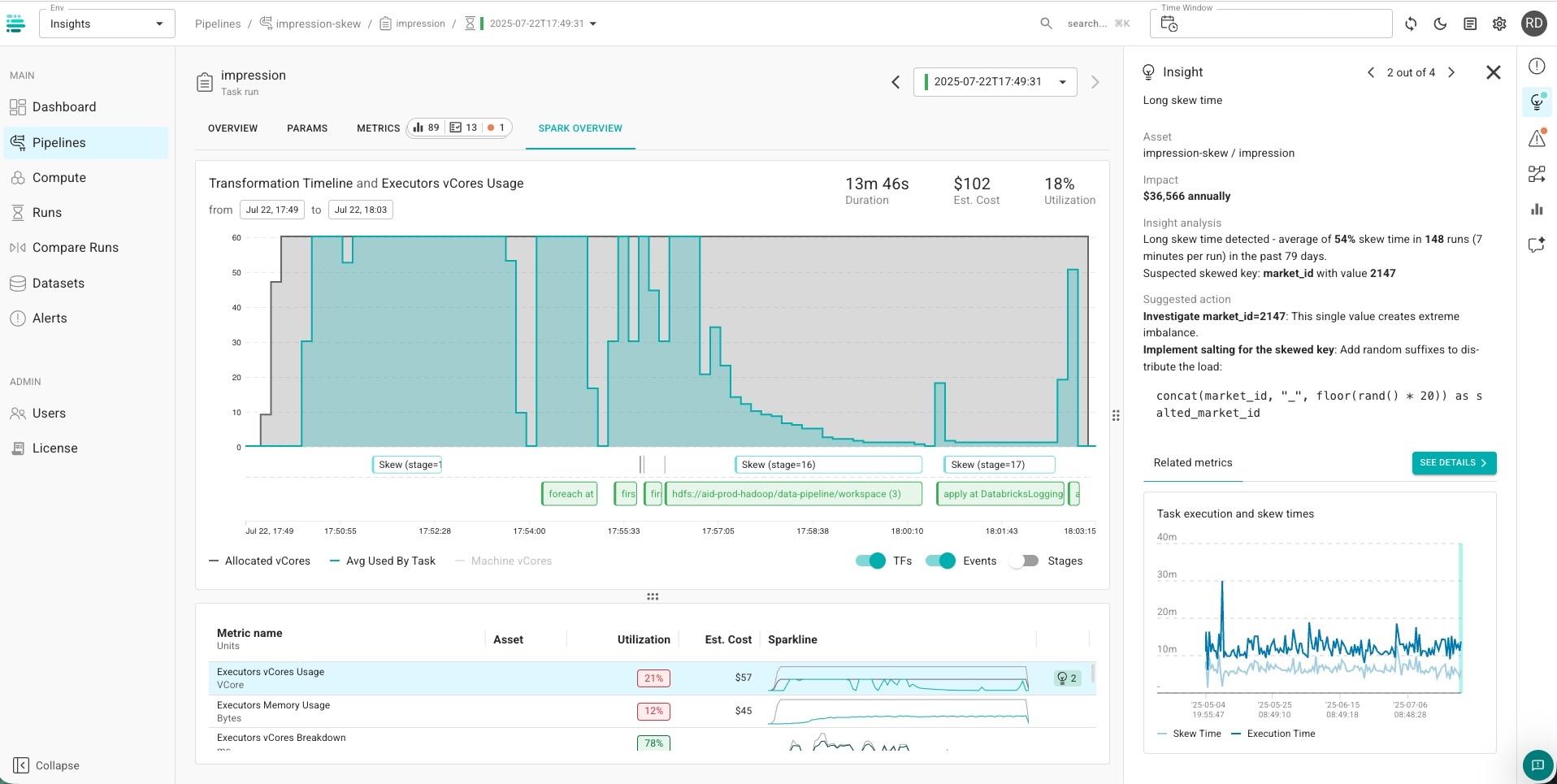
In one workload, data skew accounted for an average of 54% of the affected execution time across 148 runs over 79 days – roughly seven minutes out of 13 minutes per run.
The task-level behavior made the imbalance visible:
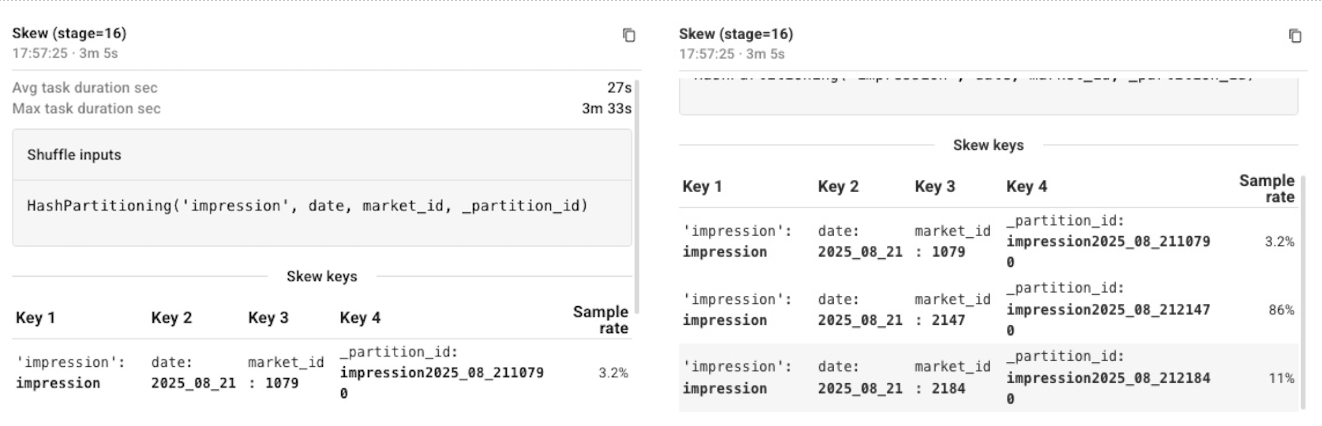
- Average task duration: 27 seconds
- Maximum task duration: 3 minutes 33 seconds
But detecting that the workload had skew wasn't the difficult part.
The useful diagnosis was determining where the skew occurred, how much runtime it was costing, which key was causing it, and which value of that key was responsible.
The affected stage was partitioned by:
HashPartitioning(
  impression,
  date,
  market_id,
  _partition_id
)
From there, the investigation could correlate the long-running tasks with their shuffle partitions and then inspect the values contributing to those partitions.
That isolated market_id = 2147 as the hot value responsible for the imbalance.
So the finding wasn't simply: This workload has data skew.
It was:
Affected query / stage
        ↓
54% average skew time
        ↓
~7 minutes per run
        ↓
Partitioning key: market_id
        ↓
Hot value: 2147
That distinction matters because "data skew" isn't yet an actionable root cause and "the stage is slow" gives you dozens of possible optimizations.

However, "one partition is several times slower than its peers, and the partitioning expression contains a highly concentrated market_id value" gives you a much narrower problem to investigate and resolve.
In this case, the recommended optimization was to salt the affected key so records associated with the hot value could be distributed across multiple partitions:
concat(market_id, "_", floor(rand() * 20)) as salted_market_idSalting adds complexity and may require corresponding downstream logic, so you don't want to apply it generically because a stage happens to have a long tail. Here, the specific key and value had been identified and their impact quantified.
The result: 24% reduction in stage runtime.
The useful investigation isn't "do I have skew?" Task distributions and shuffle behavior already tell you that you have an imbalance.
The harder questions are: Where exactly is the skew? How much is it costing? Which key and value are responsible?
Once you have those answers, you can fix the actual data-distribution problem rather than treating skew as a generic performance symptom.
3. Data access: sometimes Spark is waiting, not computing
CPU utilization can also be low for a completely different reason: Spark may not have useful compute work to do yet.
This is particularly important with object storage. Before executors can process files, the application may need to discover them, refresh file indexes, retrieve metadata, and determine which objects are relevant.
If you're only looking at executor utilization or the volume of data eventually processed, that time can be hard to explain.
At this layer, the useful signals need to connect storage activity with Spark activity. S3 LIST, HEAD, GET, and related operations tell you what the storage layer is doing. File and partition counts tell you how broad the discovery operation is. Driver and executor utilization tell you whether useful compute is actually happening during that period.
The question becomes:
How much work did Spark have to do just to locate the input?
Typical failures include excessive directory or partition listing, repeated file-index refreshes, missing pruning, and reading from overly broad paths.
What can fool you is looking only at the final amount of data processed. A job can process the correct small dataset after doing significant unnecessary work to find it.
Example case: filtering the right data, too late
One workload needed a specific set of date partitions from an S3 dataset.
Conceptually, the code was doing this:
spark
  .load("s3://impressions/")
  .where(
    $"year"  === year &&
    $"month" === month &&
    $"day"   === day
  )
The predicate itself was correct. The application only wanted those partitions.
But the broad S3 prefix was supplied as the input path. The workload therefore spent significant time on S3 operations associated with discovering and indexing the input before useful processing could proceed.
The utilization graph made this visible in an interesting way: there wasn't a compute bottleneck to optimize. Driver and executor vCore utilization showed periods where very little compute work was happening while S3 operations continued.
Looking at the storage operations alongside the runtime exposed two related behaviors: slow input loading and slow file-index refresh.
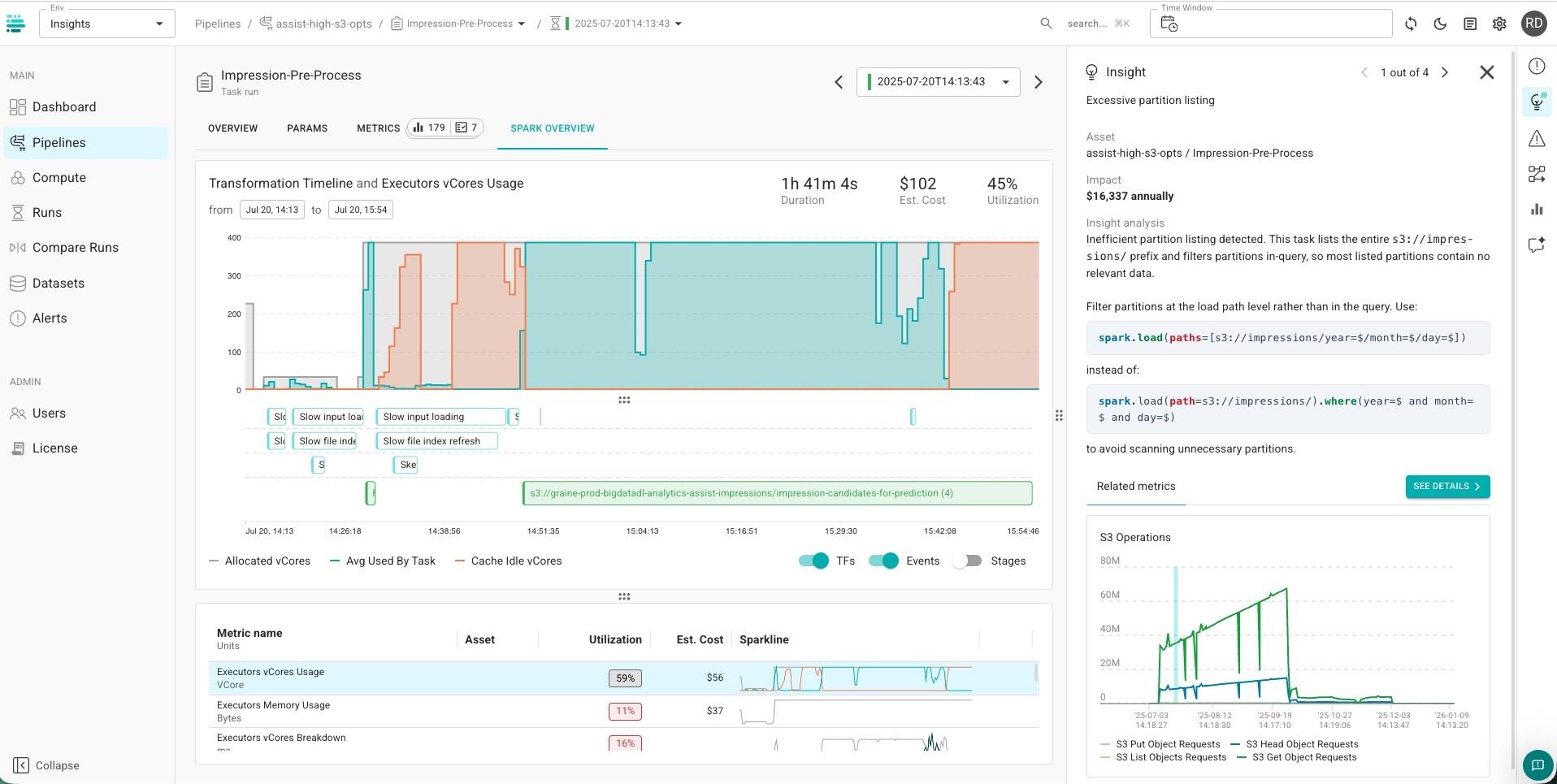
The optimization was to avoid beginning with the entire prefix when the relevant partition paths were already known:
spark.load(paths = Seq(
"s3://impressions/year=/month=/day=/"))
Now the location itself constrains what needs to be discovered, rather than starting broadly and relying on filtering later.

This is a useful distinction when investigating low utilization. Low CPU doesn't automatically mean "use smaller machines." Sometimes the cluster is correctly sized but is stalled on work happening outside the executor's compute path.
Correlating driver/executor utilization with storage operations helps distinguish the two.
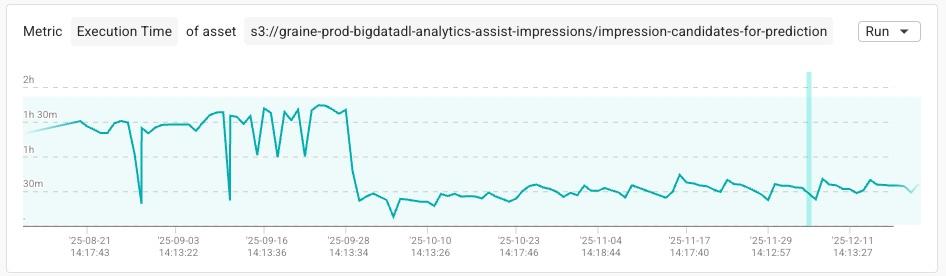
The result: 95% fewer S3 operations and job runtime reduction from 1h:38m to 34m
4. Query plan and code: what static code analysis doesn't tell you
The previous examples all involve work around Spark execution: how resources are provisioned, how tasks are distributed, and how data gets into the computation.
But sometimes Spark itself looks great.
The CPUs are busy. Executors are working. Tasks are progressing.
That's when utilization can be most misleading. And it's also where static code analysis has a fundamental limitation: it can analyze what the code is doing, but not how that code behaves with production data at runtime.
At the query-plan layer, the most useful signals describe how data changes as it moves through the plan: rows entering and leaving operators, intermediate cardinality, shuffle and sort volume, spill, operator runtime, and repeated scans.
Instead of asking only "which operator is slow?", ask:
Where does the amount of work suddenly explode – and where does it collapse again later?
Those discontinuities often reveal expensive application logic: a late filter, unnecessarily broad join, huge candidate-generation step, repeated sort/window, or intermediate dataset that mostly gets discarded downstream.
Typical failures include late filtering, cardinality explosions, unnecessary sorts and windows, repeated computation, and poor pruning inside otherwise busy workloads.
And what can fool you is precisely the metric engineers often trust most: high utilization. Spark can keep every CPU busy for hours doing work that never should have existed.
The question changes from:
"Is Spark efficiently executing this workload?"
to:
"Should Spark be executing this much work at all?"
Example case: 47-hour pipeline, traced to one line of code
A KNN recommendation pipeline was taking approximately 46.7 hours to run across 56 stages.
Its resource utilization looked high. There wasn't an obvious "your cluster is idle" problem.
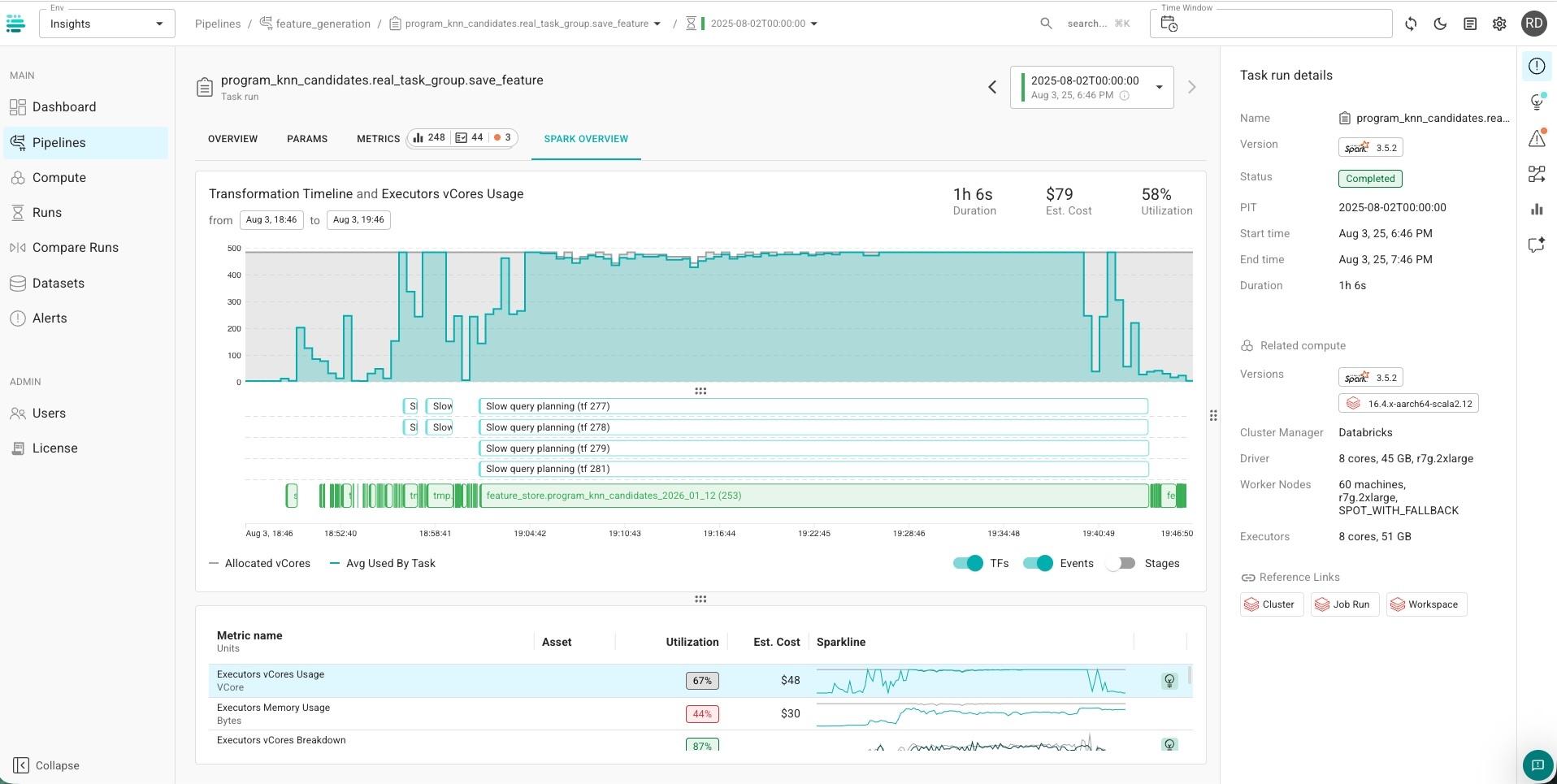
And its query plan was roughly 10,000 lines long.
Reading a plan of that size top-to-bottom looking for bad application logic isn't a useful debugging strategy. Instead, the runtime gives you a way to narrow the search.
Start with the costliest query.
Within that query, identify the stages consuming most of the runtime.
Then map the expensive stage back into the relevant portion of the query plan.
That turns the investigation into something closer to:
Expensive workload
      ↓
Costliest query
      ↓
Heaviest stage
      ↓
Expensive operator
      ↓
Cardinality change
      ↓
Relevant application code
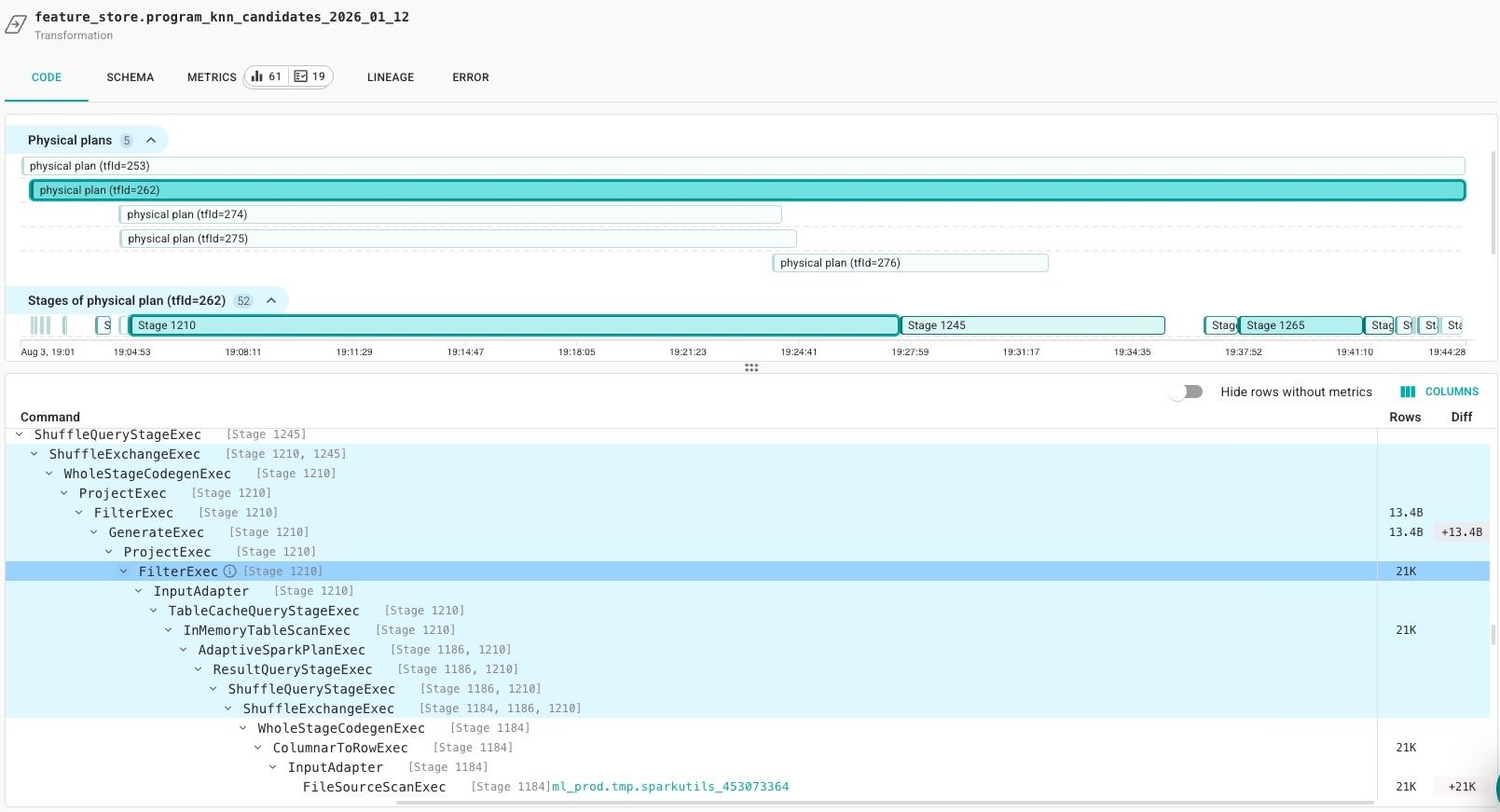
In this workload, that process led to a KNN computation generating on the order of 13 billion intermediate records, followed later in the plan by filtering that reduced the dataset by orders of magnitude.
In other words, Spark was doing exactly what the application told it to do: generate a huge candidate set, move and process those records through subsequent operators, and only later discard almost all of them.
One particularly expensive stage ran for more than 20 hours. Another spent roughly 10 hours performing large sorting operations, with substantial memory usage and disk spill.
The runtime wasn't pointing to slow hardware. It was pointing to too much intermediate data.
Tracing that cardinality change through the plan eventually narrowed a ~10K-line plan down to the application logic responsible for generating the oversized candidate set and filtering it too late.
The optimization was therefore not "make the sort faster."
It was to stop creating so much data before the sort exists.
That included reducing the number of KNN candidates generated and moving filtering earlier in the execution path, so downstream operators never receive billions of records that won't survive to the final result.
A separate stage exposed another version of the same pattern at the input side: roughly 997 GB was being read to produce only tens of thousands of rows, pointing to an additional pruning opportunity.
These ratios are useful diagnostic signals:
input rows     → operator → output rows
22K            →   ...    → billions

billions       → filter   → tiny fraction retained

~997 GB read   →   ...    → tens of thousands of rows
The exact ratio that's "bad" depends on the workload. Joins, aggregations, Cartesian operations, and ML workloads can legitimately change cardinality dramatically.
But when an expensive stage creates orders of magnitude more data and a later operator immediately removes nearly all of it, it's worth asking whether the reduction can happen earlier.
The result: 72% runtime reduction and $24K annualized savings.
Utilization tells you how busy Spark is. Not whether the work makes sense.
None of these problems has the same root cause.
One wastes capacity because executors don't fit efficiently onto machines. One loses time because a hot key concentrates work into a few tasks. One spends time discovering data before computation begins. One keeps the entire cluster extremely busy processing billions of intermediate records that mostly disappear later in the plan.
And that's why there isn't one metric that tells you whether a Spark workload is efficient.
Utilization is still useful. So are job cost, stage duration and input size. But each is a starting signal, not a diagnosis.
To find the less obvious waste, you have to follow the work across layers:
How was the compute allocated? How was the work distributed? What data did Spark have to discover and read? And, finally, why did the query plan create that work in the first place?
Sometimes the biggest Spark optimization isn't making the workload run faster.
It's finding the work it never needed to do.